Friday, 8 June 2012

FireMonkey iPhone/iPad links and info

This week’s instalment of the UK-based Developer Direct webinar series is called iPhone/iPad Development with RAD Studio XE2. The following is a set of links and general information picked up during that broadcast and also during a US webinar by Anders Ohlsson (broadcast during the week and presumably to be available as an on-demand webinar after the fact) entitled Create Mobile iOS Apps using Delphi XE2 with FireMonkey.

Links:

Info:

  • iPhone and iPad run an operating system called iOS, the current version of which (at the time of writing) is 5.1.1.
  • RAD Studio runs on Windows. iOS development requires use of a Mac and also Apple’s Xcode development suite (this gives you the iPhone/iPad simulator and various tools to sign and package the app correctly).
  • Additionally, the current toolset requires an intermediate step involving the FreePascal Compiler (FPC) inside Xcode to build (and debug) the iOS app. This is a temporary initial situation while waiting for Delphi to be able to target ARM processors.
  • Caution: FPC is case-sensitive in terms of the uses clause!
  • To target latest iOS and have all the bits you need, you need:
    • a Mac with OS X 10.7.x (known as Lion) running.
    • Xcode 4.2 (a slightly older version of Xcode that installs appropriate required command-line tools) installed on the Mac. You can get this from Apple’s Developer Downloads page (requires an Apple ID)
    • Install on the Mac the packages from FireMonkey-iOS.dmg (installed by RAD Studio / Delphi on your Windows machine into a FireMonkey-iOS folder) to get:
      • FreePascal Compiler (FPC), required to build your iOS app from within Xcode
      • FireMonkey iOS Libraries – required files that FPC needs to build the iOS app on the Mac
    • Xcode 4.3 – most recent update of Xcode, which supports the more recent iOS releases (5.x). Also worth noting that 4.3.x does not install some required command-line tools by default. One benefit of having installed 4.2 first is that you will have these tools installed. That said, you can download them in isolation from Apple’s Developer Downloads page (requires an Apple ID)
    • Modify one of the iOS FMX support files, as per Anders’ post
    • Install Anders’ iOS components into RAD Studio
  • To get Xcode you need to join the Apple Developer Program (free). To deploy apps to a real device (iPad or iPhone) as opposed to the simulator, you need to join Apple’s iOS Developer Program ($99 per year to Apple) and create a Development Provisioning Profile. To deploy an app to the Apple App Store you need to create a Distribution Provisioning Profile. Plenty of information can be found in the RAD Studio documentation.
  • When writing iOS code in Delphi XE2 these directives instruct the Free Pascal Compiler to support Delphi and Objective-C language features:
      {$ifdef FPC}
        {$mode delphi}
        {$modeswitch objectivec1}
      {$endif}
  • When Delphi targets ARM, the FreePascal dependency will be removed, as will the need to use the Xcode IDE. However some Xcode command-line tools will still be required on the Mac for signing, packaging etc. since Apple does not license these tools to third party tool vendors.
  • iOS development from RAD Studio XE2 with FireMonkey is currently Delphi-only. C++ iOS support is pending, as per the recently published C++ roadmap. As soon as the C++ compiler targets ARM, then C++ will also directly generate iOS applications.
  • When Delphi and C++ target ARM7, FireMonkey applications will support both iOS and Android directly from the IDE via new Target Platform options.
  • Simplistic way of ensuring a screen full of controls laid out for an iPhone screen will fill up an iPad screen is to place all the controls on a TScaledLayout, perhaps with Align set to alFit as opposed to alClient.
  • iOS apps should not proactively exit – they should only exit in response to the Home button. If you force an exit your app will likely not be approved by the Apple app review board.
  • After creating an iOS app in Delphi XE2 you must also export it for Xcode consumption using dpr2xcode. This exported Xcode project needs to be available to Xcode on the Mac, so some shared drive is a sensible location to save the project to in the first place. A common way of working is to have Windows (and the RAD Studio/Delphi IDE) running as a guest OS in some VM software on the Mac (where OS X is the host OS), and storing the project in a directory that is shared between the host OS and guest OS. You could use commercial VM software such as VMWare Fusion or Parallels or even the Open Source VirtualBox.

Saturday, 2 June 2012

Problems deleting assemblies from the GAC

I have occasional need to do this and, when I try and delete an item from the GAC using the Windows Explorer view (by navigating to %windir%\assembly) I always get ‘Access Denied’ errors. So to save me the age it always seems to take me to find how to overcome this each time I need to, I’ll write it here.

This requires a local security policy to be altered. Run the local security policy MMC (just start typing ‘local’ in the Windows Start menu search box) and navigate down through: Security Settings, Local Policies, Security Options and change the ‘User Account Control: Run all administrators in Admin Approval Mode’ entry to Disabled.

Now restart Windows, delete any GAC assemblies you like, reload the local security policy MMC so you can revert the policy to Enabled (and then restart again) and you’re done.

An alternative ‘sledgehammer vs. nut’ approach is, apparently, to disable User Account Control.

Friday, 1 June 2012

Mac Development links/info

This week’s instalment of the UK-based Developer Direct webinar series is called Mac Development for Windows Developers, focusing on the Mac aspects of the cross-platform development capabilities of RAD Studio XE2. The following is a set of links and general information picked up during the broadcast.

Links:

Info:

  • FireMonkey (typically abbreviated to FMX) is in essence a cross-platform alternative to the Windows-only VCL. VCL is the Visual Component Library, where many of the components are wrappers around Windows-supplied controls. FireMonkey targets multiple platforms and so doesn’t wrap OS controls or capabilities per se, but creates them from scratch using OS awareness, styles, etc. FireMonkey is described by Embarcadero as a Business Application Platform.
  • FireMonkey supports HD or 3D applications. A HD app is like a traditional Windows form containing controls that are familiar in business applications. a 3D app is a 2D view on a 3D world and so is more suited to 3D graphics scenarios.
    When creating either, the choice affects the form created in the application. However a FireMonkey HD form (a TForm) can make use of FireMonkey 3D components (using a TViewPort3D), and a FireMonkey 3D form (a TForm3D) can make use of FireMonkey HD components (using a TLayer3D, as discussed in the documentation). See this part of the documentation for details.
  • Ctrl+. is the keystroke to get IDE Insight – the incremental search across much of the IDE’s content including components, environment options, project options and more.
  • paserver (Platform Assistant Server) needs to run on OS X to allow RAD Studio’s 32-bit Windows-based IDE to start and communicate with (i.e. launching & remote debugging) an app built and deployed to another target platform, e.g. 64-bit Windows or Mac OS X.
  • When compiling a multi-platform project, each target has its own output subdirectory within the project directory tree, namely: Win32, Win64 and OSX32.
  • Action lists, audio and video are not currently supported in FireMonkey but these are things that are being worked on for future versions.
  • Mixing FMX & VCL integration in an application must occur through dynamic linking; it won’t pan out well if you try and use static linking.

RAD Studio XE2 for the price of Delphi XE2 or C+Builder XE2

Embarcadero are pushing out deals at the moment. In addition to the C++Builder bundle deal written about here, here’s the latest one I’ve bumped into: for the month of June 2012 if you buy either Delphi XE2 or C++Builder XE2 (new user or upgrade, Professional, Enterprise, Ultimate or Architect edition) and you get the full equivalent edition of RAD Studio XE2.

So, in addition to the originally purchased Delphi or C++Builder, you also get the other one of those two, in addition to Embarcadero Prism XE2.5 (aka Oxygene for .NET 5.1) and RadPHP XE2.

You can find what’s new in Prism XE2.5 either on the Oxygene section of the RemObjects web site or in marc hoffman’s blog post. In short you get support for building Metro apps for Windows 8, mapped types, flow control analysis and the neat async future await keyword.

Full details of the deal are available here.

Friday, 25 May 2012

InterBase links/info

This week’s instalment of the UK-based Developer Direct webinar series is called From Data to Business Information with RAD Studio XE2, which focused on InterBase, the multi-platform database that runs on Windows, Mac, Linux and Solaris. The following is a set of links and general information picked up during the broadcast.

Links:

Info:

  • Access InterBase from Delphi/C++Builder using:
    • InterBase Express (IBX) – components on the InterBase page of the tool/component palette. These surface lots of InterBase-specific functionality
    • dbExpress (DBX) – components on the dbExpress page of the tool/component palette. This accesses InterBase to the same level that any other database can be accessed.
  • InterBase supports triggers, which are special cases of stored procedures that are automatically called before/after insert/update/delete calls
  • InterBase supports events to notify client apps (e.g. using TIBEvents IBX component) of things of interest to avoid the need for polling. Event alerters in the DB are special cases of stored procedures associated with insert, delete or update operations.

Tuesday, 22 May 2012

C++Builder info/resources

Embarcadero seem to be ramping up their C++ machine now and are issuing a bunch of information on the subject of C++Builder. This seems in keeping with Microsoft who are doing the same, what with C++ being one of the standard tools for developing Windows 8 applications.

As recently posted, DavidI is delivering a weekly series on learning FireMonkey and this is broadcast twice, once for Delphi users and once for C++Builder users.

There is also a dedicated C++ webinar looming at the end of May. This will be presented by Dan Wahlin, a Microsoft MVP and is all about creating Windows and Mac OS X applications from a single C++ code base. The signup link is here.

A new C++ white paper is now available, entitled From Visual C++ to Mac in 90 Seconds, written by Jason Vokes. This looks at how readily Visual C++ developers can pick up FireMonkey to produce applications targeting the growing Mac user base.

An important posting came from John Ray Thomas, Embarcadero Director of Product Management, that being the C++ roadmap from Q2 2012. This lays out the plans for the new C++ tool chain, targeting 64-bit Windows, ARM for iOS and Android, support for C99 and C++11, BOOST and ACE and more. Much of this is already in Beta 1 and soon to enter Beta 2. The current plan is to support C++11, 64-bit Windows and iOS before the end of 2012, with Android support coming in the first half of 2013.

Given that C++Builder XE2 already makes use of a highly customised clang front-end, some have speculated (see the comments on this post) that it would make sense that a lot of this support would come from continuing this development and making use of the LLVM back-end, as that already supports multiple targets.

Finally, Embarcadero are offering the following deal to C++Builder users. If you buy XE2 with maintenance then you will get priority access to a preview of the new compiler as and when it starts appearing and also get you all this new functionality as and when it ships. In addition, the cost will be discounted by 20% until 29th June 2012.

Friday, 18 May 2012

Delphi Language links/info

This week’s instalment of the UK Developer Direct webinar series is called Delphi Language Focus (Object development, RTTI, 64 Bit). The following is a set of links and general information picked up during the broadcast.

Links:

Miscellaneous info

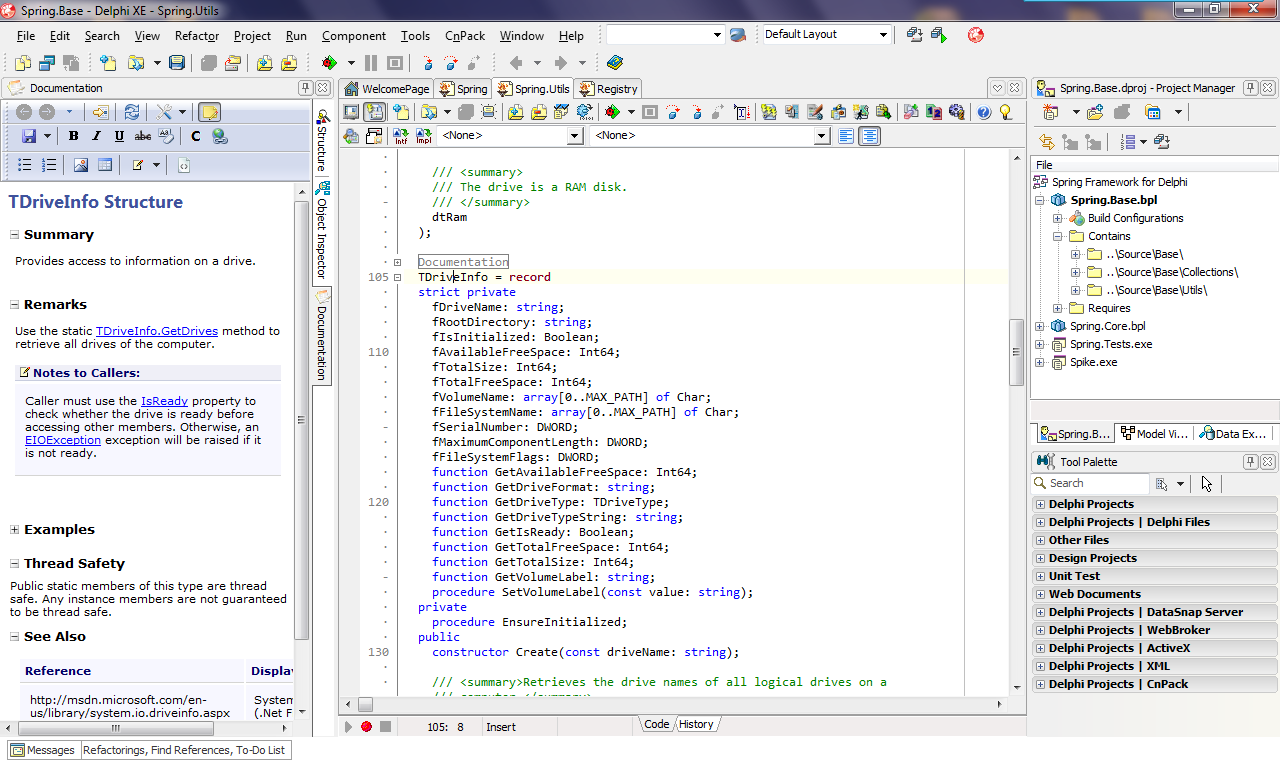
  • XML documentation comments against types, methods, etc. are automatically turned into descriptive tooltips through IDE facility called Help Insight. To ease the process of creating correctly formed XML comments for this purpose, you can use Documentation Insight. This is a third part tool (it’s the Express version DevJet’s Documentation Insight product) bundled with the IDE that adds in a window to the IDE to help automate the process of adding in the correct comments, based on editor context. To access Documentation Insight, press Ctrl+Alt+D or choose Tools, Documentation Insight, Show Documentation Insight
  • Ctrl+Shift+G generates a GUID and inserts it in the code editor, including the appropriate braces, quotes and square brackets
  • Extended RTTI is only supported on Win32/Win64, not currently OS X. At least I think this is what I heard. If so, this is most likely due to assembly code in the RTTI support code that is pending translation to be suitable for OS X.
  • Delphi now supports scoped enumerations, as per C# and the Oxygene language. This reduces the need for prefix letters on enum values.
  • TOSVersion is a new record type in the SysUtils unit to analyse which platform architecture and version you are running on.
  • Multi-platform enabled TZipFile is available in the System.Zip unit. It supports, among other things, adding an existing file into an archive but such that it is stored in the archive with another name.

64-bit information:

  • 64-bit Windows application development has been introduced in RAD Studio XE2
  • On 64-bit Windows, Task Manager highlights 32-bit (x86) applications by suffixing the process name with *32; 64-bit (x64) applications have no suffix.
  • The Project Manager’s Target Platforms section allows a VCL app to target either Win32 or Win64, and FMX (FireMonkey) applications can target Win32, Win64 or OS X.
  • A primary benefit of targeting 64-bit Windows is the ability to range as much memory as your machine can address. In the case of a 32-bit app running in a 32-bit OS, a max of 4GB of memory, but that includes memory reserved by the graphics card and various system devices and all the memory space Windows reserves for itself. Generally a 32-bit Windows OS can access between 2.75GB and 3.5GB max and user processes have a maximum accessible memory space of 2GB (or 3GB if Windows is started with a special switch). See this MS article for more details.
  • The size of pointer types (e.g. object references) change between 32-bit and 64-bit.
  • NativeInt is 32-bit or 64-bit based on target platform. The TComponent Tag property is defined to be NativeInt to cater for the common habit of developers storing pointers (such as object references) in Tag (with a suitable typecast).
  • Integer remains 32-bit when targeting 64-bit apps.
  • To build a 64-bit app all dependent libraries must also be 64-bit. 32-bit DLLs and libraries are not usable in 64-bit apps.
  • 64-bit has but one calling convention, very much unlike 32-bit. However the 64-bit compiler just ignores the Delphi calling-convention keywords register, pascal, cdecl & stdcall, so you can leave them in. No need for conditional compilation.
  • Assembler code: rewrite it in Pascal so it works on any target. Inline assembly code is platform-dependant and so will need rewriting for 64-bit and will require a _lot_ of learning – there are many differences. Additionally, if targeting OS X there will be a host of additional requirements thanks to the way the OS architectures differ.
  • 32-bit values (e.g. Integer) will shl & shr in 32-bit space.
  • 64-bit does not support the Extended type (well, ok it does, but it’s mapped onto the 10-byte type Double) but Delphi offers the TExtended80Rec record type to process extended values from binary data files.